🛸 How I became a YouTube Certified™ quadcopter pilot

An introduction to first-person-view (FPV) quadcopter flying, my learning approach, architecture diagram, and youtube videos...
Discovering First Person View (FPV)
In '25 my son, Sequoyah Rice, turned me on to FPV quadcopters by showing some videos he recorded from his FPV goggles, featuring his acrobatic and freestyle moves. His skilled flying and practical advice encouraged me launch into the sport and learn some foundational hardware and electronics skills along the way. For which I am thankful! I'll share some of those tips below.
Freestyle, cinematics and many other genres
First Person View (FPV) is a new phenomenon, sport, and hobby, which has only been accessible for perhaps less than a decade, because of low-cost, miniaturized electronics and sensors. It's totally immersive and exhilarating, with a live stream of video directly into your goggles, and complete remote control over all flight parameters: throttle, yaw, pitch and roll. FPV quads (aka drones) are characterized by high speed, maneuverability, and durability. High voltage lithium polymer rechargeable batteries provide the juice which is required for these high performance craft.
There are several sub-genres and specializations of FPV, both good and nefarious. My interests are mainly in Freestyle, Cruising and Cinematics.
- Cruising/Cinematic: Just exploring for recreation, or mount a 4K HD camera on a FPV quad to make movies or short form content.
- Freestyle: The culture around freestyle and acrobatics is fluid, with pilots constantly inventing and naming new tricks and maneuvers, so the lexicon keeps evolving as the community pushes creative boundaries, much like the culture of skateboarding and surfing.
- Racing: Organizations like Drone Racing League and MultiGP have high speed race courses and tournaments.
- Sports: The Milano-Cortina 2026 Winter Olympics featured FPV quads streaming video in practically every event, which was groundbreaking.
- Long range, high speed, and other specializations.
How to learn
This is the standard approach. Yes, you really need to learn on a simulator!
- Buy a radio controller with USB port for use with simulator software, and eventually for use with your future quad. A real radio controller is required to build up your coordination and muscle memory on the sticks/gimbals. I use the RadioMaster TX15. Some planning is required because the radio controller must use the same protocol as your future quad's radio receiver. My kit uses ExpressLRS.
- Buy a simulator game on Steam. I tried several and prefer LiftOff. It's affordable and has realistic physics.
- Log at least 20 hours learning to fly in the simulator. There are YouTube tutorial videos by Joshua Bardwell which step-by-step introduce you to flying via the LiftOff simulator.
- Learn to solder and how to use an electronics multimeter. For a DIY drone build there are 20+ solder joints, some of which are fairly intricate. Some folks were fortunate enough to learn soldering in high school, but that wasn't the case for me. Learn the difference between rosin-core and acid-core solder (I wasted some money, not knowing the difference). Rosin-core is what you want.
- Learn about the FAA's recreational use exemption and associated educational curricula. A sub-250 grams quadcopter kit is recommended.
- Do the build then start flying. Details omitted 😅
- Keep returning to the LiftOff simulator on bad weather days, or to learn new maneuvers in a safe environment.
Don't adore your quad too much. It's just a tool and it will inevitably get lost or destroyed. However, the benefit of going the DIY build route is you can upgrade or replace any of the individual components.
Architecture diagram
This diagram explains the high level components in my build:

Photo
DIY FPV Drone Kit - QAV-S 2 Sub-250 Joshua Bardwell SE 3” - Analog
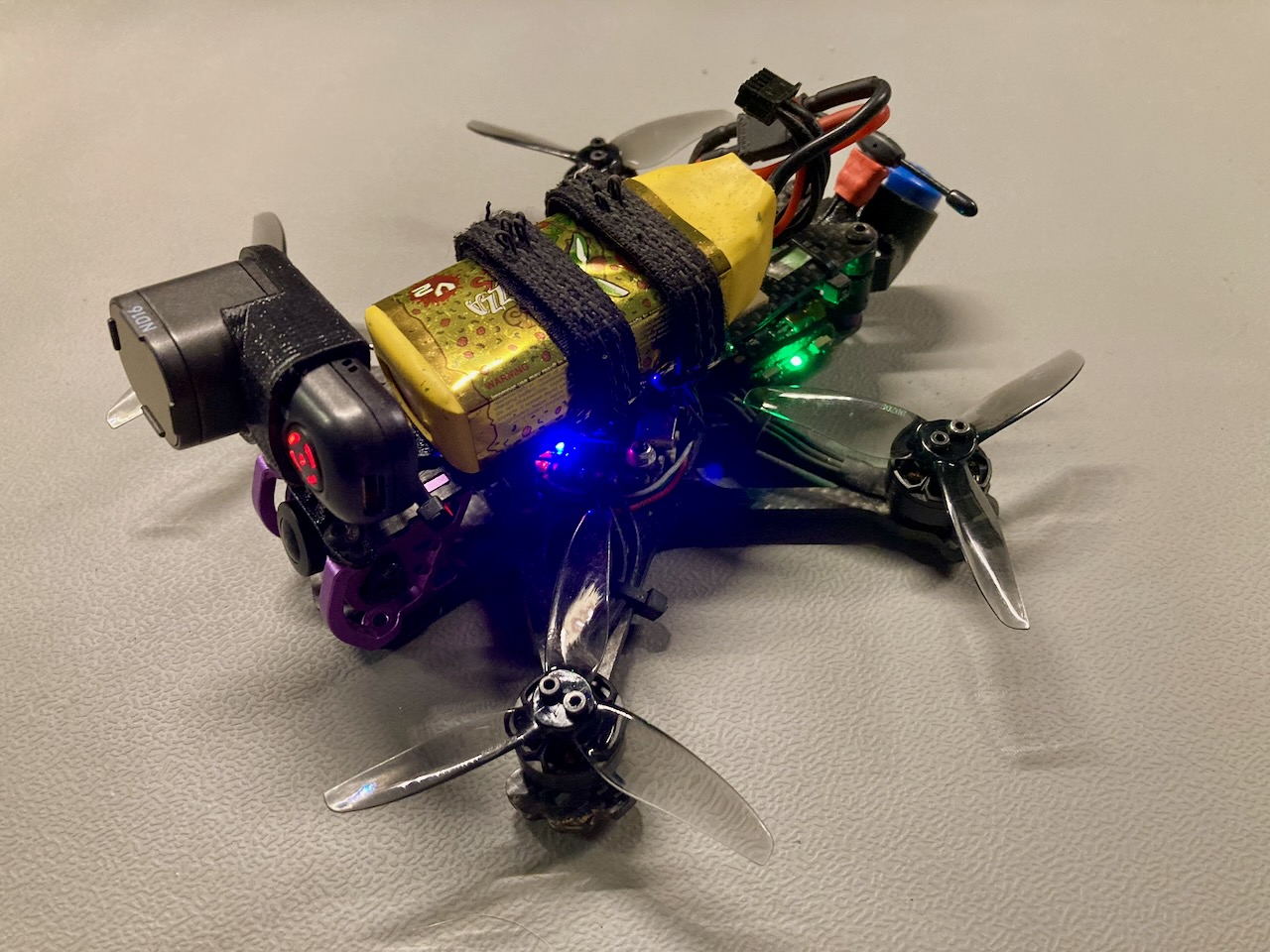
Parts list and software links
- 🛸 Lumenier DIY FPV Drone Kit - QAV-S 2 Sub-250 Joshua Bardwell SE 3” - Analog with Betaflight
- 🎬 RunCam Thumb Pro 4K HD camera, post-processed with GyroFlow
- 📡 RadioMaster RP1 V2 Receiver with ExpressLRS
- 🎮 Radiomaster TX15 Controller with ExpressLRS
- 🥽 SkyZone SKY04O PRO OLED FPV goggles + omni antenna: VAS Ion Pro, and patch antenna: TrueRC X-AIR MK. II
- 🔋 Gaoneng GNB 4S 650+720MAH HV (4.35v) Li-Po Batteries - XT30
My YouTube channel: @westslopeflow
I create quadcopter FPV flying videos in 4K HD set to music, and post them to YouTube. Consider adding a Like and Subscribe!
🌎 Thanks for rambling! 👋🏼